Take your team to the next level
Request additional information for an Inhouse Cohort



Like our articles?
If you like our free articles, why stop there?
Take the next step in your career with the Product Masterclass — the 8-week program that turns you into an AI-native product manager.
Your AI Keeps Forgetting You. Context Engineering Fixes That.
You are not bad at prompting. Your AI just has amnesia. Here is how to fix it with a context system that persists.
You are not bad at prompting. Your AI just has amnesia.
There is a pattern I see in almost every product team that uses AI. They open a new chat, paste a wall of background info, wait for a useful answer, close the tab. Tomorrow they do it again. Same context. Same wall of text. Same result that almost works.
This is AI Amnesia. Every session starts from zero. Your product knowledge, your user research, your strategic constraints. gone. The AI that helped you write that sharp stakeholder response yesterday has no idea who you are today.
The result is always the same. Generic advice. Requirements that could be for any company. A copilot that behaves like a smart intern who gets their memory wiped every night.
The fix is not better prompts. It is building a context system that persists.
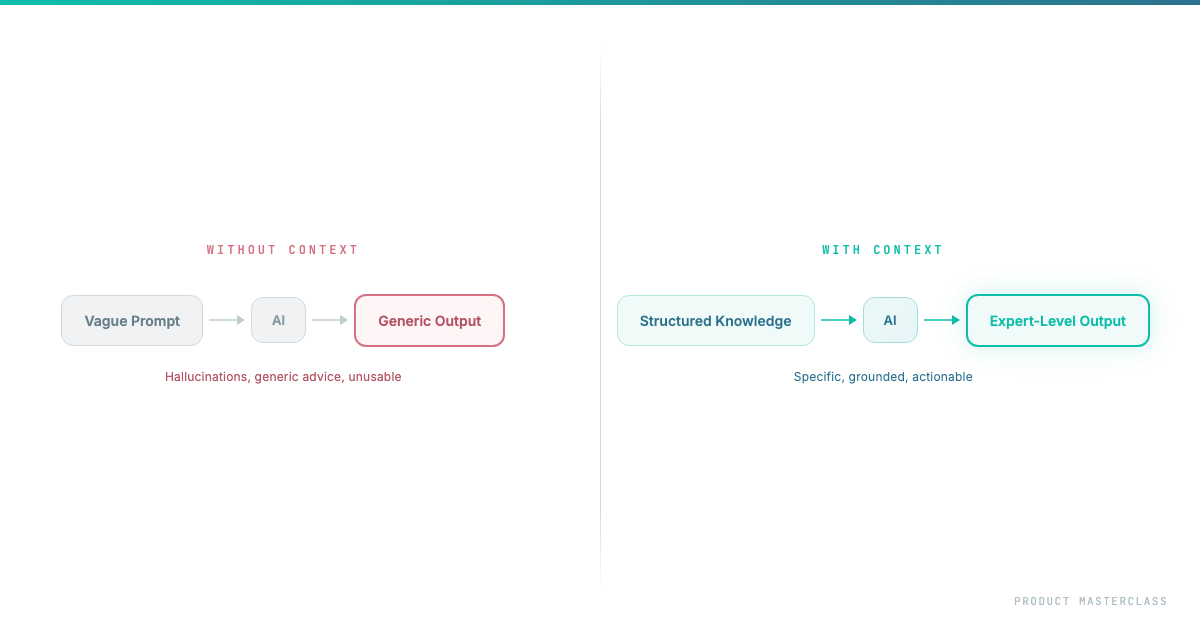
Without Context vs With Context
What Context Engineering Is (and Why PMs Need It)
Context Engineering is the practice of building, structuring, and maintaining the information layer that AI needs to be genuinely useful for YOUR product, YOUR team, YOUR decisions.
Think of it this way. When a new PM joins your team, they don't become useful on day one. They need weeks of context. reading docs, sitting in meetings, understanding the history. Only then do their contributions become sharp.
AI is the same. Except it forgets everything overnight. So most people never solve the root problem. They just re-brief their amnesiac intern every morning and wonder why the output feels generic.
There's a principle in computing that applies directly here: Garbage In, Garbage Out. If your context is cluttered Jira tickets, outdated Confluence pages, and vague strategy docs, AI will produce confident nonsense. The goal isn't to feed AI everything. it's to feed it the right things. Good context is curated, not collected.
The Five Layers of Product Context
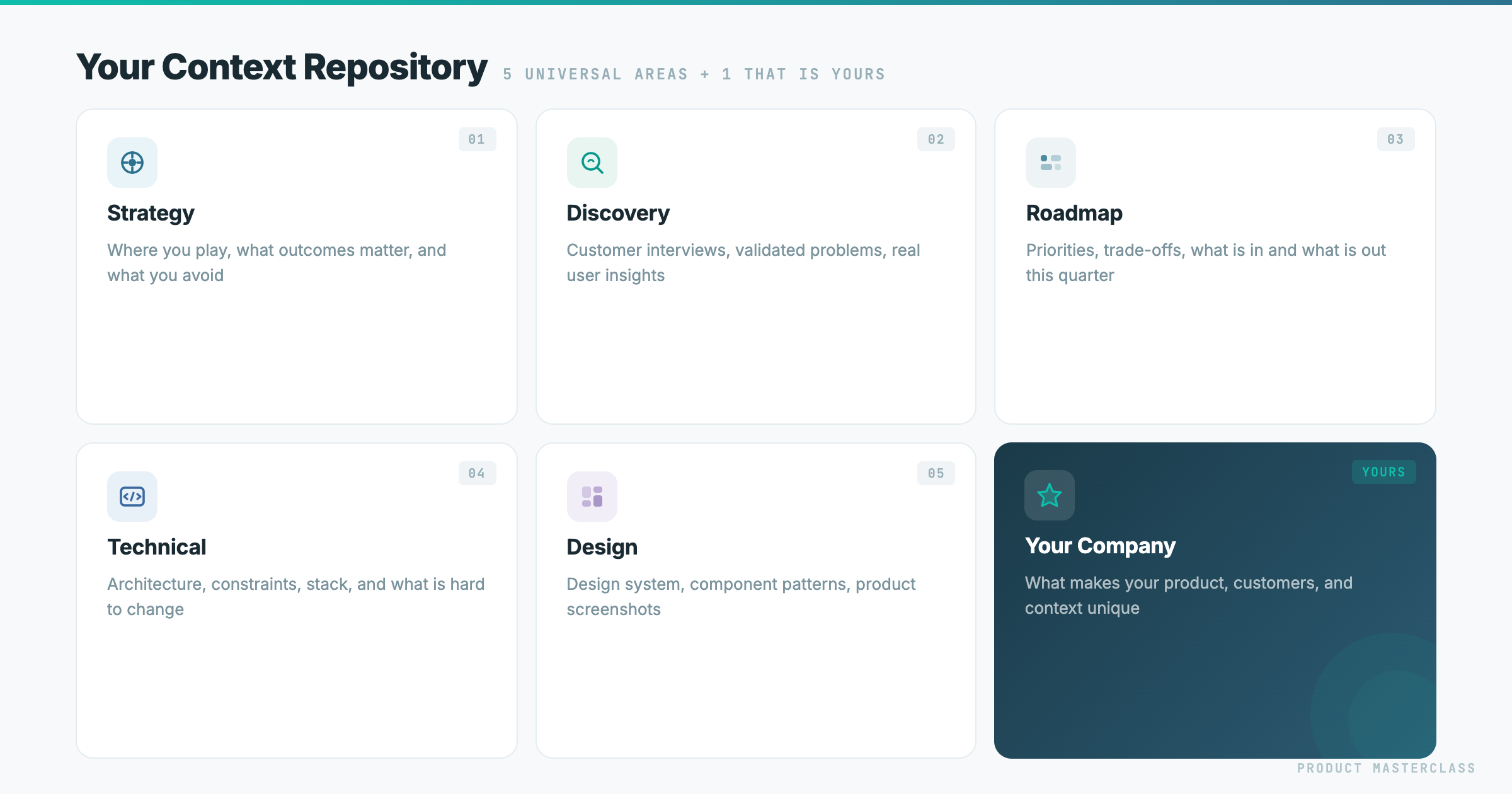
The five context areas. plus one that is yours
After working with dozens of product teams and building this into our Product Masterclass curriculum, I've landed on five layers that make AI actually useful for product work.
Layer 1: Strategy Context. The Where.
Before anything else, AI needs to know where you're headed and why.
What goes in:
- Company mission and product vision
- Current strategic bets and the reasoning behind them
- Market positioning - who you compete with and how you differentiate
- Business model constraints that shape product decisions
- OKRs or strategic goals for the current period
Why it matters: Without strategy, AI can help you build the right feature the wrong way. With it, every decision gets checked against direction. "This feature request is interesting, but it pulls us toward enterprise customization when our strategy is self-serve scale." Strategy is the filter that keeps everything else honest.
Layer 2: Discovery Context. The Why.
This is everything you know about your users and their problems.
What goes in:
- Key findings from customer interviews, tagged and summarized
- The strongest quotes - verbatim, with attribution
- Your Value Proposition Canvas or equivalent
- Validated problems vs. assumptions you're still testing
- User segments and their core jobs-to-be-done
Why it matters: Without this layer, AI writes feature descriptions. With it, every requirement traces back to a real user problem. When AI generates a ticket, it can reference the exact interview where a customer described the pain. It doesn't write "As a user, I want to...". it writes requirements grounded in evidence.
Layer 3: Roadmap and Prioritization. The What and When.
This is your decision layer - what you're building, what you chose not to build, and why.
What goes in:
- Your prioritized roadmap with the rationale behind each item
- RICE scores or whatever prioritization framework you use
- What was explicitly deprioritized and the reason
- Current quarter focus areas
- Your stakeholder map - who cares about what, their influence level
Why it matters: AI can't help you make scope decisions if it doesn't know your strategy. But when it has your roadmap rationale, it can draft stakeholder responses with evidence. "This connects to initiative X, which we prioritized because..." or "We considered this and deprioritized it because..."
Layer 4: Technical Context. The How and the Constraints.
This is the layer most PMs skip entirely. And it's the one that makes the biggest difference in requirement quality.
What goes in - three approaches, start with the easiest:
Option 1: Record your architect. Have a 15-minute conversation with your tech lead or architect. Record and transcribe it. That's it. AI now "knows" your architecture from the engineer's own words. Anyone can do this by tomorrow.
Option 2: Feed your docs. Upload system diagrams, API specs, data models. Even a photo of a whiteboard architecture sketch. Most companies have some documentation, even if it's outdated.
Option 3: Connect your codebase. AI reads your actual code, data model, APIs. Requirements become architecturally aware: "This data already exists in the user profile table - no new schema needed."
Also include your backlog here. an export of your last 50-100 Jira or Linear tickets, current sprint items, known tech debt. AI detects patterns you miss: "You already have 3 tickets related to this. This requirement overlaps with work from last quarter." Even without architecture docs, your backlog teaches AI a lot about your system.
Why it matters: Without this layer, PMs write requirements that are technically naive. With it, AI flags feasibility issues before you bring them to refinement. It suggests simpler alternatives. It produces acceptance criteria that engineers actually respect.
Layer 5: Design Context. The Look and Feel.
This is the layer almost every PM ignores. It's also the one that makes the biggest jump in requirement quality for anything user-facing.
What goes in:
- 5-10 screenshots of your actual product
- Wireframes and user flows
- Your design system. colors, typography, spacing, component library
- Any UI specs or Figma links your team works from
Why it matters: When AI can see what your product looks like, it writes requirements that fit the actual interface. not abstract features that could mean anything. It stops suggesting things that would break your design system. It starts referencing real UI patterns your team already uses.
What You Get: Requirements, Decisions, and Prototypes Without Starting From Scratch
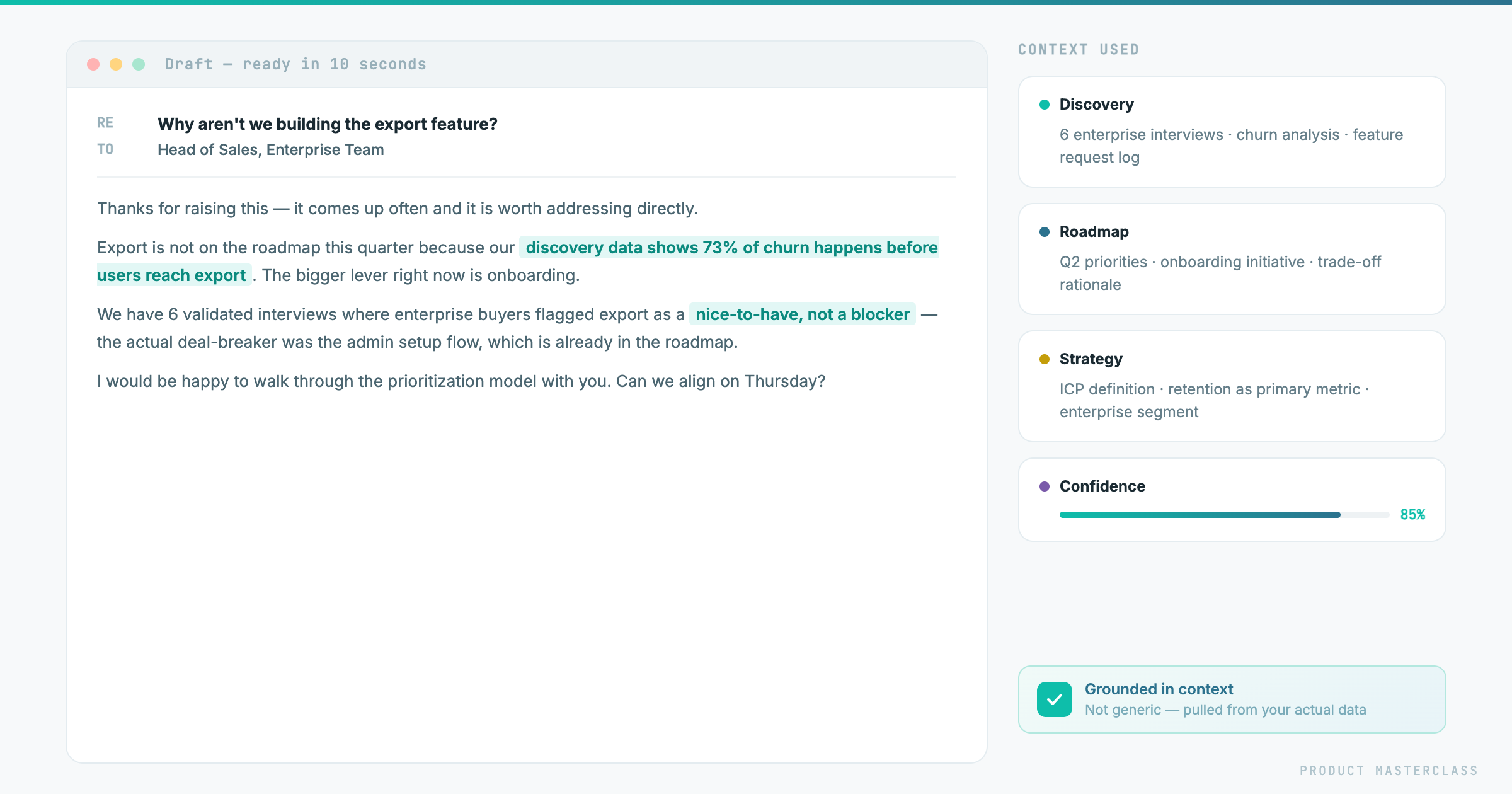
Stakeholder response. drafted in 10 seconds from structured context
Here's the part that changed how I think about product work.
When your context is complete, things stop being tasks you do. They become outputs that fall out. Not just requirements. Everything.
Requirements fall out. You say: "Take initiative X from our roadmap and create dev-ready tickets." AI produces stories traced to interview quotes, acceptance criteria shaped by technical constraints, open questions flagged from architecture gaps. The WHY travels with the ticket because AI has your discovery layer.
Stakeholder responses fall out. Someone asks for a feature that doesn't fit your roadmap. AI drafts a response with evidence: "We considered this. Here's why we prioritized X instead, and here's how your request connects to what's planned for Q2." You used to spend 30 minutes crafting that email. Now it takes 2.
Prototypes fall out. You describe the problem, AI has your discovery context, your design system, your technical constraints. It builds a working prototype you can put in front of users the same day. not a mockup, not a wireframe, something clickable. The context is what makes it realistic rather than generic.
Ad-hoc decisions fall out. Sales pings you: "Can we do X for this prospect?" You paste the request into AI with your context loaded. In 30 seconds you have an answer with evidence - either "yes, it aligns with our bet on Y" or "no, and here's why, and here's what we could offer instead."
The point isn't that AI does your job. The point is that with the right context, the mechanical parts of your job - formatting, grounding, cross-referencing, drafting - disappear. What's left is judgment, decisions, and relationships. The parts that actually matter.
One honest note: this only works if the context stays current. A strategy file from three months ago will give you confident, well-formatted, wrong answers.
The good news: if you're using Claude, the maintenance largely takes care of itself. You don't update files manually. you just tell Claude what changed. "We dropped the WhatsApp channel from the roadmap" or "We got new data. notification overload is now correlated with trial-to-paid drop-off, not churn." Claude updates the relevant context file on the spot. The next time you ask it anything, it's already working from the new information.
With other AI tools, you update the file yourself and re-upload it. Still manageable. just slightly more deliberate.
How to Wire Your Context Into Your AI Workflow
If you want to build this properly, Claude Code is the natural home for it.
The concept is simple: you store your five layers as files in a folder, and you add one central file. a CLAUDE.md. that connects Claude to all of them. It doesn't read the layers itself. It makes them available to skills that pull from them when needed.
A skill is a reusable instruction set for a specific task. writing a dev-ready ticket, drafting a stakeholder response, building a prototype. When you trigger a skill, it reaches into whichever context layers are relevant and uses them to produce the output.
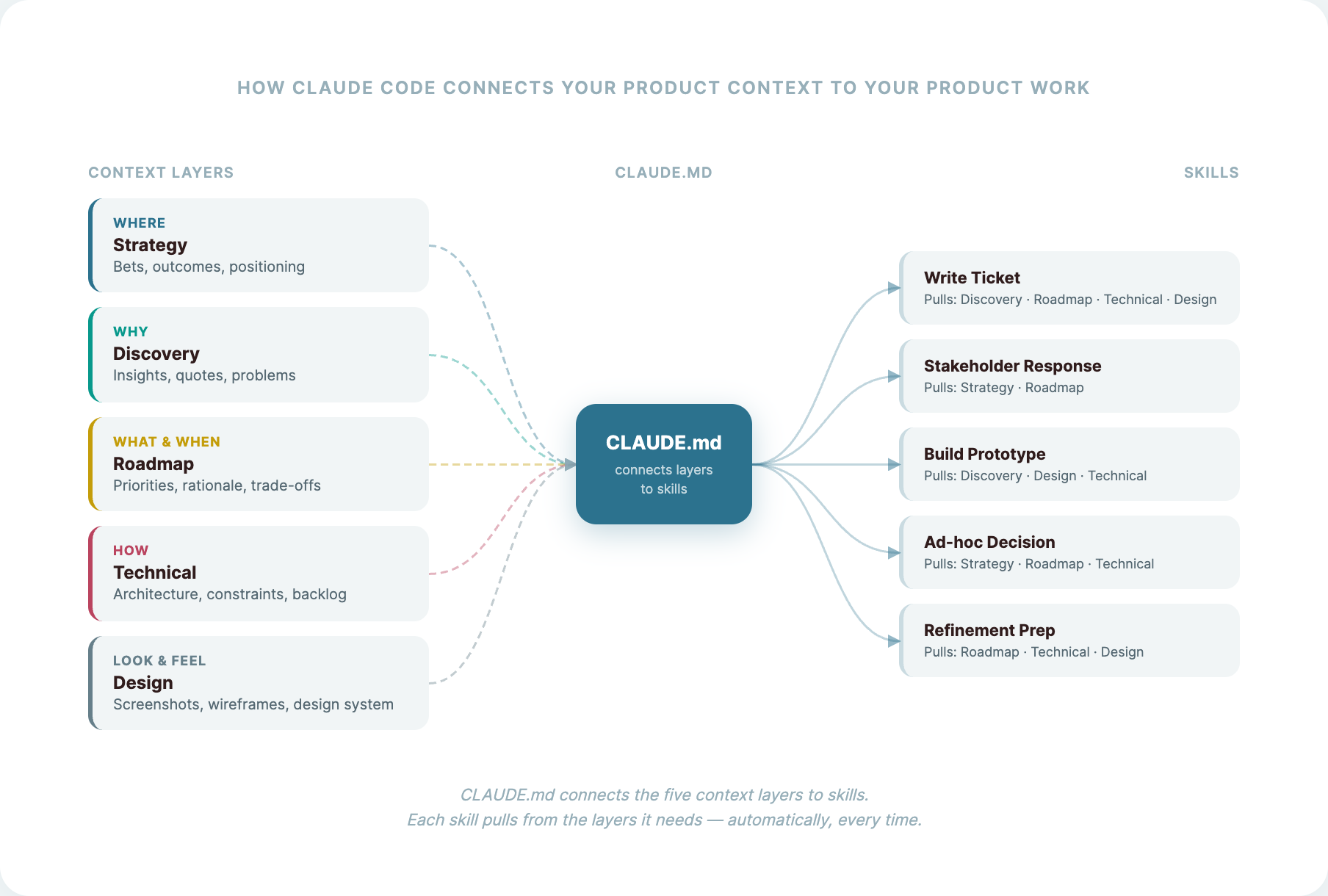
CLAUDE.md connects to the five context layers, skills pull from them
So when you say "write a ticket for the notification filtering initiative," the ticket-writing skill pulls your roadmap rationale, cross-references the discovery insights, checks the architecture constraints, and references the right component from your design system. All of that happens automatically. because the connections are already in place.
And when something changes. a strategy shift, a new discovery round. you just tell Claude what changed. It updates the relevant layer file. Every skill that touches that layer picks up the change immediately.
Start Today, Not Monday
You don't need to write everything from scratch. You already have most of this. it's just scattered. Here's how to pull it together:
Strategy. Load your existing strategy docs. pitch deck, positioning document, OKRs, whatever you have. Then have a conversation with AI: explain what your product does, who it's for, what you're betting on this quarter. Let AI ask you questions. Save the output as your strategy file. Twenty minutes and it's done.
Discovery. Gather your interview transcripts or research notes. even rough ones. Drop them in and ask AI to extract the key insights, validated problems, and strongest quotes. You don't curate manually. You let AI do the first pass and then review it.
Roadmap. Export your current priorities from wherever they live. Notion, Jira, a deck. Add a short note on what you explicitly decided not to build and why. That rationale is what makes this useful.
Technical. Have a 1-on-1 with your tech lead. Record it, transcribe it, drop the transcript in. That's your architecture context. If you already have docs, add those too.
Design. Screenshots of your product work. But something even better: if your product's layout is on your website, you can extract the design system directly from the CSS. colors, typography, spacing, component patterns, all machine-readable. AI will work with that more precisely than it will with images.
Then ask AI to summarize what it now knows about your product. Ask it to write one ticket for your top priority.
Compare that to what you'd have gotten from a blank prompt.
That's the difference. That's context engineering.
At Product Masterclass, we train product managers to work effectively in the AI era. Our 8-week intensive program covers everything from customer interviews to context engineering to building your personal AI workflow. Check out the next cohort
Discover where product management is heading
Stay up to date with our Product Newsletter and do not miss out on free articles, videos, templates, events on Product Management